Maintaining a projector screen is crucial for preserving image quality and extending its lifespan. Regular, gentle cleaning with appropriate tools like compressed air and microfiber cloths, coupled with environmental control, prevents dust accumulation, smudges, and material degradation. Neglecting maintenance can lead to hazy visuals and premature wear, impacting the immersive home theater experience.
Understanding Your Projector Screen Material
Before attempting any cleaning, it’s vital to identify your projector screen’s material. Different surfaces demand specific care, and a one-size-fits-all approach can lead to irreparable damage.
Matte White/Grey Screens
These are among the most common and versatile screen types, offering a balanced image with good viewing angles. Matte white screens scatter light evenly, while grey screens enhance contrast in rooms with some ambient light. Their textured surfaces can trap dust in tiny crevices. For these screens, gentle wiping with a soft, lint-free microfiber cloth is generally safe. For stubborn marks, a mild soap and water solution can be used.
High-Gain & Coated Screens
High-gain screens, often made with glass beads or specialized coatings, are designed to reflect more light back to the viewer, resulting in a brighter image. Coated screens, such as silver 3D or specific white gain surfaces, feature delicate finishes. These materials are more susceptible to damage from harsh chemicals or aggressive scrubbing. They require a very gentle approach, often preferring dry brushing or light, directional wiping to preserve their reflective properties and coatings.
Ambient Light Rejecting (ALR/CLR) Screens
ALR and Ceiling Light Rejecting (CLR) screens are optical instruments with microscopic structures designed to block ambient light and reflect only the projector’s light. These are incredibly delicate. Improper cleaning, especially scrubbing against their microscopic grain, can flatten the ridges and permanently ruin their contrast and light-rejection capabilities. Compressed air is often the safest first step, with very gentle blotting or specific directional wiping (e.g., side-to-side) if absolutely necessary.
Acoustically Transparent Screens
Designed with tiny perforations to allow sound to pass through, these screens require care to prevent clogging. Dusting with compressed air or a soft brush is ideal. Avoid using liquids that could seep into the perforations and leave residue, potentially affecting both image and sound quality.
Routine Cleaning Practices
Regular, gentle maintenance is the best defense against dust and minor smudges, preventing them from becoming stubborn stains. Incorporating these simple steps into your routine will significantly extend your screen’s life and maintain optimal picture quality.
Dusting with Compressed Air and Microfiber Cloths
Dust is the primary enemy of screen clarity, acting like a filter that dims your projected image. For routine maintenance, compressed air is your best friend. Hold the can upright and at a distance of at least six inches from the screen, using short bursts to dislodge loose particles without touching the surface. For more persistent dust or light smudges, a high-quality, lint-free microfiber cloth is essential. Gently glide the dry cloth across the screen, applying minimal pressure. Avoid regular household cloths, which can contain abrasive fibers that might invisibly scratch delicate screen surfaces.
The Importance of Gentle Handling
|
Our Picks for the Best Projector Screen in 2026
As an Amazon Associate I earn from qualifying purchases.
|
||
| Num | Product | Action |
|---|---|---|
| 1 | 120inch Outdoor Projector Screen with Stand: 16:9 4K HD Portable Projector Screen Outdoor Indoor - Front/Rear Movie Screen with Carry Bag, Sandbag - Projection Screen for Backyard, Camping, Theater |

|
| 2 | Projector Screen,HUANYINGBJB 4K 16:9 HD Rear Front Projector Screen Foldable Projection Screen Double-Sided Portable Outdoor Indoor Projector Screens for Movie Home Theater (120) |
|
| 3 | Pyle 50 Inch Portable Projector Screen with Tripod Stand – Lightweight, Durable, Easy Pull Setup Mobile Projection Screen with 4:3 Aspect Ratio, White Matte Fabric for Indoor/Outdoor Use |
|
| 4 | TOWOND Projector Screen and Stand, 150 inch Indoor Outdoor Projection Screen, Portable 16:9 4K HD Rear Front Movie Screen with Carry Bag Wrinkle-Free Design for Home Theater Backyard Cinema |
|
| 5 | 120 inch Projector Screen 2025 Upgraded- Black Backing, Straight Edges, Foldable, Washable and Wrinkle-Free - for Indoor Home Theater and Outdoor Cinema -White 16:9 by IOLIEO |
|
| 6 | AAJK Projector Screen 150 inch, Washable Projector Screen 16:9 Foldable Anti-Crease Portable Projector Movies Screen for Home Theater Outdoor Indoor Support Double Sided Projection |
|
| 7 | Outdoor Projector Screen with Stand - 120 Inch Portable Projector Screen Indoor and Outdoor Projector Screens 16:9 4K HD Wrinkle Free Lightweight Movie Screen with Carry Bag,Enioy Movie Nights |
|
| 8 | Taotique Projector Screen 72 inch, Movie Projector Screen 16:9 HD Foldable and Portable Anti-Crease Indoor Outdoor Projection Double Sided Video Projector Screen for Home, Party, Office, Classroom |
|
| 9 | TOWOND Projector Screen with Stand, 100 inch Outdoor Projector Screen Portable Indoor Projection Screen 16:9 4K Rear Front Movie Screen with Carry Bag for Home Backyard Theater 100 inch |
|
| 10 | TOWOND Outdoor Projector Screen with stand, 120 inch Portable Movie Screen - 16:9 4K HD Foldable Anti-Crease Projection Screen with Carry Bag for Movie Nights, Camping and Parties Support Double Sided |
|
Projector screens, especially the more advanced optical types, are delicate. Never scrub the surface, as this can permanently damage the material or its specialized coatings. Always use the softest touch possible. When handling, whether for cleaning or adjustment, it is highly recommended to wear clean gloves to prevent transferring natural skin oils and fingerprints, which can be surprisingly difficult to remove without aggressive cleaning that might harm the screen. This “no-touch” policy for bare hands is crucial for preserving your screen’s integrity.
Addressing Fingerprints and Smudges
Even with the best intentions, fingerprints or light smudges can appear. For these, a slightly dampened, lint-free microfiber cloth can be effective. Prepare a solution of 95% distilled water and 5% mild, pH-neutral dish soap. Distilled water is key to preventing mineral deposits and water spots. Dip the cloth into the solution and wring it out thoroughly until it is barely damp. Gently blot or wipe the affected area. For ALR screens, blot gently, or wipe only in the direction of the screen’s linear structure (often side-to-side). Immediately follow with a separate dry microfiber cloth to absorb any remaining moisture and prevent streaks.
Deep Cleaning for Stubborn Stains
When routine care isn’t enough, stubborn marks may require a more targeted approach. Deep cleaning should be performed with caution and only when necessary, as excessive liquid or harsh chemicals can do more harm than good.
Creating a Safe Cleaning Solution
For marks that resist dry dusting or light damp wiping, a diluted cleaning solution is usually the next step. As mentioned, a mixture of 95% distilled water and 5% mild, non-abrasive dish soap is recommended. Avoid any cleaners containing ammonia, alcohol (unless explicitly recommended by the manufacturer for specific spots on vinyl, and used sparingly), solvents, or abrasive components. These chemicals can strip coatings, cause discoloration, or permanently damage the screen’s optical properties. Always test any new solution on an inconspicuous area first, if possible, to ensure it doesn’t adversely affect the material.
The “Dab, Don’t Scrub” Technique
For dried-on spots or sticky residue, the “dab” technique is far safer than scrubbing. Dampen a microfiber cloth with your prepared solution, ensuring it is only slightly moist, not saturated. Gently press the damp cloth onto the stained area, allowing it to sit for a few seconds to re-hydrate and soften the mark. Then, gently lift the cloth, repeating the process if necessary. This method minimizes friction and reduces the risk of damaging the screen surface. Never rub vigorously, as this can embed the stain further or create permanent scuffs.
Wiping Directions: Horizontal vs. Up-Down
The direction of wiping is critical, especially for ALR screens. Many screens, particularly those with specialized optical layers, have a linear structure. For these, wiping gently from left to right, or side to side, is often recommended. Some coated screens or specific ALR types may even suggest an up-and-down motion. The key is to never wipe in circular motions, as this can create visible swirl patterns that become glaringly obvious when the projector is active. Always consult your screen’s manufacturer guidelines for the precise wiping direction recommended for your specific material to avoid voiding warranties or causing damage.
Drying Techniques to Prevent Watermarks
After any wet cleaning, immediate and thorough drying is crucial. Use a second, completely dry, lint-free microfiber cloth to gently pat the cleaned area dry. Do not let the screen air dry, as this can lead to unsightly watermarks or mineral deposits, especially if you haven’t used distilled water. For retractable screens, it is imperative that the screen is entirely dry before rolling it up. Rolling up a damp screen can lead to mold growth, permanent creasing, or material degradation.
Environmental Factors and Storage
A significant part of screen maintenance involves controlling its environment and ensuring proper storage, preventing issues before they even arise.
Temperature and Humidity Control
Extreme fluctuations in temperature and humidity can negatively impact your projector screen’s material, potentially leading to warping, bubbling, or degradation of its surface. Keep your viewing area at a stable, moderate temperature and humidity level. Excessive dampness can encourage mold growth, while overly dry conditions can create static electricity, attracting more dust. A consistent environment helps preserve the screen’s physical integrity and optical performance.
Protecting from Direct Sunlight
Direct sunlight is a silent destroyer of projection screens. Prolonged exposure to UV rays can cause screen materials to fade, yellow, or become brittle over time, permanently altering their color accuracy and reflective properties. Position your screen away from windows, or use blackout curtains to shield it from harsh sunlight, even when not in use. This simple measure can significantly prolong your screen’s lifespan and maintain its original vibrancy.
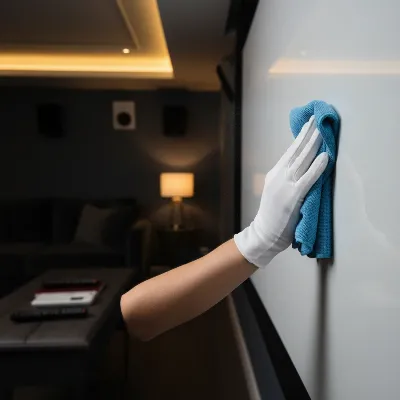 Close-up of a projector screen being gently dusted with a microfiber cloth, in a soft, controlled home theater environment
Proper Storage for Retractable Screens
Retractable screens offer convenience and space-saving benefits, but they require careful storage. Always retract the screen into its casing when it’s not in use. This protects the delicate viewing surface from dust, accidental damage, and light exposure. Before retracting, ensure the screen is completely dry after cleaning, and free of any debris that could be rolled into the mechanism, causing creasing or damage to the surface. Regularly inspect the retraction mechanism for smooth operation.
Dust Covers and “No-Touch” Policies
For fixed-frame screens or screens left exposed for extended periods, a simple dust cover can be highly beneficial. A soft, clean sheet draped over the screen when not in use can prevent airborne particles from settling, reducing the frequency of cleaning needed. Reinforcing a strict “no-touch” policy for all users helps prevent the accumulation of fingerprints and oils, which are among the most common and difficult-to-remove contaminants. Education about proper handling can save a lot of future maintenance effort.
Advanced Care and Prevention
Beyond routine cleaning and environmental control, a few additional steps can enhance your screen’s longevity and performance.
Regular Alignment Checks
For motorized or tensioned screens, regular checks of the screen alignment and tension are important. A misaligned or improperly tensioned screen can lead to wrinkles, ripples, or distorted images, compromising your viewing experience. Follow your manufacturer’s instructions for any adjustments to ensure the screen remains perfectly flat and taut. For fixed-frame screens, ensure the frame itself remains stable and securely mounted, as any flexing can affect the screen material.
Ventilation for Motorized Screens
If your projector screen is motorized, ensuring proper ventilation for its internal components is crucial. Adequate airflow prevents the motor from overheating, which can extend its operational life. Avoid obstructing any vents on the casing and ensure there’s sufficient space around the screen housing for heat dissipation. Overheating can lead to motor failure or erratic operation, requiring costly repairs.
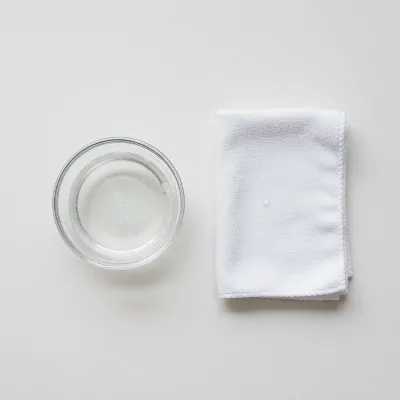 A small bowl with a mild cleaning solution and a damp microfiber cloth, in a clean, professional setting.
Avoiding Harsh Chemicals and Abrasives
This cannot be stressed enough: never use harsh chemicals, abrasive sponges, paper towels, or strong solvents like Windex, acetone, or benzene on your projector screen. These products are designed for different surfaces and will almost certainly strip delicate coatings, leave permanent streaks, or cause irreversible damage to the screen material. Always err on the side of caution and use only what is recommended by the screen manufacturer – typically mild soap and distilled water, or specialized screen cleaning kits.
Consulting Manufacturer Guidelines
The most definitive source of maintenance information for your specific projector screen will always be the manufacturer’s official guidelines or user manual. These documents provide precise instructions tailored to the unique materials and technologies used in your screen. Before attempting any cleaning or repair, always refer to these instructions to ensure you are following the correct procedure and to avoid voiding any warranties. When in doubt, contact the manufacturer’s support for expert advice.
Conclusion
Maintaining your projector screen is a straightforward but essential task that directly impacts the quality of your viewing experience and the longevity of your investment. By understanding your screen’s material, adopting gentle cleaning routines, controlling its environment, and adhering to manufacturer guidelines, you can ensure your screen delivers stunning visuals for years to come. Treat your projector screen with the care it deserves, and it will continue to provide a brilliant, immersive display every time you power up your projector. What aspect of projector screen care do you find most challenging in your home setup?
Frequently Asked Questions
Frequently Asked Questions
How often should I clean my projector screen?
For routine dusting, cleaning every few weeks or as soon as visible dust accumulates is ideal. For deeper cleaning to remove fingerprints or stains, address them immediately to prevent them from setting, but avoid excessive wet cleaning which can be harder on the screen material.
Can I use rubbing alcohol to clean my projector screen?
Generally, no. Rubbing alcohol and other organic solvents can permanently damage the delicate coatings and materials of most projector screens, especially ALR and coated types, and can void your warranty. Only use a highly diluted solution of mild dish soap and distilled water, or specifically recommended cleaning solutions by the manufacturer.
What should I do if my retractable screen gets wrinkled?
Minor wrinkles may sometimes resolve themselves over time if the screen is kept fully extended and properly tensioned. For more persistent wrinkles, consult your manufacturer's guide. Avoid attempting to iron or apply heat, as this can severely damage the screen material.
Is it safe to use a vacuum cleaner on my projector screen?
Using a vacuum cleaner directly on your screen is generally not recommended due to the risk of scratching the surface with attachments or applying too much suction, which could damage the material. Stick to compressed air or a soft, lint-free microfiber cloth for dust removal.
How can I prevent static electricity on my screen that attracts dust?
Maintaining a balanced humidity level in your viewing room can help reduce static electricity. Using a high-quality, anti-static microfiber cloth for dusting can also be beneficial. Avoid overly dry environments, as they tend to increase static charge.
What causes those shiny spots on my projector screen after cleaning?
Shiny spots or streaks are often caused by using harsh chemicals, scrubbing too hard, leaving cleaning solution residue, or allowing the screen to air dry without immediately wiping away moisture. Always use distilled water, mild soap, and a dry cloth for immediate drying after wet cleaning.
Get our weekly buyer guide
Practical specs, not advice. Unsubscribe anytime.

I’ve always been a bit nervous about cleaning my matte white screen, but these tips made it so much clearer. The advice about using compressed air first to get rid of loose dust was a game-changer. My screen looks so much brighter now, and I feel confident I won’t damage it. Definitely recommend following these steps for anyone with a home theater setup.
This was super helpful! I used to just wipe my screen down with whatever I had, but realizing how important it is to use the right tools like a soft microfiber cloth has totally changed my approach. My image quality has definitely improved since I started following these maintenance steps. No more hazy visuals for my movie nights!
Good info overall, especially about identifying your screen material before cleaning. I have a grey screen and was hoping for a bit more detail on specific products for tougher smudges beyond just a microfiber cloth. It’s a solid starting point, but I still feel like I need to do more research for deeper cleaning.
My outdoor projector screen gets pretty dusty, and I’ve been looking for a good routine to keep it clean without ruining the material. The environmental control tips, especially protecting it from direct elements when not in use, really resonated with me. It’s made a noticeable difference in how long the screen stays clean between uses.