A projector screen serves as the canvas for your immersive home theater or crucial business presentation. Yet, over time, dust, fingerprints, and accidental smudges inevitably accumulate, dimming your visuals and compromising the clarity you expect. Ignoring these blemishes won’t make them disappear; in fact, allowing dirt to settle can lead to more stubborn stains and even permanent damage. The good news is that maintaining a pristine projector screen is entirely possible from the comfort of your home, provided you use the right tools and techniques. This guide will walk you through safe, effective cleaning methods tailored to different screen types, ensuring your display always delivers crystal-clear images and enjoys an extended lifespan.
Understanding Your Projector Screen Material
The golden rule of projector screen maintenance is: know your screen. Unlike a window or a television, projector screens are often crafted with delicate, specialized coatings and textures designed to optimize light reflection and image quality. These unique properties mean that a one-size-fits-all cleaning approach can do more harm than good, potentially causing irreversible damage. Always refer to your projector screen’s user manual or the manufacturer’s website for specific cleaning recommendations before attempting any method.
Why Knowing Your Screen Matters
|
Our Picks for the Best Projector Screen in 2026
As an Amazon Associate I earn from qualifying purchases.
|
||
| Num | Product | Action |
|---|---|---|
| 1 | TOWOND Outdoor Projector Screen with stand, 120 inch Portable Movie Screen - 16:9 4K HD Foldable Anti-Crease Projection Screen with Carry Bag for Movie Nights, Camping and Parties Support Double Sided |

|
| 2 | Pyle 50 Inch Portable Projector Screen with Tripod Stand – Lightweight, Durable, Easy Pull Setup Mobile Projection Screen with 4:3 Aspect Ratio, White Matte Fabric for Indoor/Outdoor Use |
|
| 3 | Projector Screen,HUANYINGBJB 4K 16:9 HD Rear Front Projector Screen Foldable Projection Screen Double-Sided Portable Outdoor Indoor Projector Screens for Movie Home Theater (120) |
|
| 4 | Taotique Projector Screen 72 inch, Movie Projector Screen 16:9 HD Foldable and Portable Anti-Crease Indoor Outdoor Projection Double Sided Video Projector Screen for Home, Party, Office, Classroom |
|
| 5 | TOWOND Projector Screen with Stand, 100 inch Outdoor Projector Screen Portable Indoor Projection Screen 16:9 4K Rear Front Movie Screen with Carry Bag for Home Backyard Theater 100 inch |
|
| 6 | AAJK Projector Screen 150 inch, Washable Projector Screen 16:9 Foldable Anti-Crease Portable Projector Movies Screen for Home Theater Outdoor Indoor Support Double Sided Projection |
|
| 7 | TOWOND Projector Screen and Stand, 150 inch Indoor Outdoor Projection Screen, Portable 16:9 4K HD Rear Front Movie Screen with Carry Bag Wrinkle-Free Design for Home Theater Backyard Cinema |
|
| 8 | 120inch Outdoor Projector Screen with Stand: 16:9 4K HD Portable Projector Screen Outdoor Indoor - Front/Rear Movie Screen with Carry Bag, Sandbag - Projection Screen for Backyard, Camping, Theater |
|
| 9 | 120 inch Projector Screen 2025 Upgraded- Black Backing, Straight Edges, Foldable, Washable and Wrinkle-Free - for Indoor Home Theater and Outdoor Cinema -White 16:9 by IOLIEO |
|
| 10 | Outdoor Projector Screen with Stand - 120 Inch Portable Projector Screen Indoor and Outdoor Projector Screens 16:9 4K HD Wrinkle Free Lightweight Movie Screen with Carry Bag,Enioy Movie Nights |
|
Different screen materials react distinctly to various cleaning agents and pressures. For instance, a standard matte white screen might tolerate a gentle wipe with a mild solution, while an advanced Ambient Light Rejecting (ALR) screen could be permanently damaged by the same treatment. These specialized screens often feature microscopic structures that enhance contrast and brightness; harsh chemicals or abrasive wiping can flatten these structures, ruining their optical performance.
Common Screen Materials and Their Cleaning Needs
- Matte White/Grey (Vinyl, Fabric): These are common and generally more forgiving. They typically respond well to dry dusting and, when necessary, gentle wet cleaning with a very mild soap solution.
- Ambient Light Rejecting (ALR/CLR): These screens are highly delicate due to their sophisticated optical layers. They are designed to block ambient light and direct projector light back to the viewer. For ALR screens, dry cleaning with compressed air or a soft microfiber cloth is often preferred. If wet cleaning is required, it typically involves blotting with distilled water or a manufacturer-approved solution, always adhering to specific, non-circular wiping directions (e.g., up-down or side-to-side).
- Coated Screens: Many screens, including some high-gain or acoustically transparent models, feature specialized coatings. For these, dry cleaning with a microfiber cloth or soft brush is often the only recommended method. Applying water or cleaning solutions can strip or damage the coating.
- Perforated/Acoustically Transparent Screens: These screens have tiny holes for sound to pass through. Cleaning usually involves compressed air or gentle vacuuming with a soft brush attachment to remove dust without stressing the perforations.
Chemicals and Materials to Strictly Avoid
The wrong cleaning product can permanently ruin your projector screen, voiding warranties and compromising image quality. Steer clear of:
- Harsh Household Cleaners: Products like Windex, ammonia-based cleaners, bleach, acid, wax, or any abrasive cleaning agents can break down delicate screen coatings and materials, leaving permanent streaks or discoloration.
- Abrasive Materials: Never use paper towels, rough cloths, kitchen sponges, or any material that can scratch the screen’s surface. Even seemingly soft paper products can be surprisingly abrasive at a microscopic level.
- Excessive Moisture or Direct Spraying: Do not spray any liquid directly onto the screen. This can cause liquid to seep into the screen’s edges, potentially leading to warping, staining, or damage to internal components in retractable screens. Always dampen your cloth away from the screen.
Essential Tools and Safe Cleaning Solutions
Having the right arsenal of gentle tools and appropriate cleaning solutions is paramount to a successful and damage-free cleaning process. Prepare these items before you begin to ensure a smooth operation.
Must-Have Cleaning Tools
- Soft, Lint-Free Microfiber Cloths: Invest in several high-quality microfiber cloths. These are gentle, highly absorbent, and designed to trap dust and dirt without scratching delicate surfaces or leaving lint behind. Ensure they are clean before use.
- Compressed Air: Canned compressed air is excellent for blowing away loose dust and debris without touching the screen surface. Always hold the can upright and at least one inch away from the screen, using short bursts.
- Soft Brush Attachment for Vacuum: For larger areas of dust, a vacuum cleaner with a soft brush attachment on a low-power setting can be effective, especially for perforated screens. Exercise extreme caution and light pressure.
- Gloves: Wearing clean cotton, latex, or nitrile gloves will prevent you from transferring oils and new fingerprints to the freshly cleaned surface.
- Q-tips (Cotton Swabs): These are ideal for targeting small, stubborn spots without affecting a larger area.
Safe Cleaning Solutions
- Distilled Water: Tap water often contains minerals that can leave streaks or water spots when dry. Distilled water is purified and will help you achieve a spotless finish.
- Mild Dish Soap Solution: For screens that tolerate wet cleaning, a very mild solution of 95% distilled water and 5% gentle dish soap (like Dawn) is often recommended. This mild mixture can tackle greasy fingerprints and light smudges.
- Denatured Alcohol or Isopropyl Alcohol (for select spots): For particularly stubborn, greasy spots on vinyl or non-coated screens only, a small amount of denatured or isopropyl alcohol can be used sparingly with a Q-tip. This should be a last resort and immediately dabbed dry. Always test in an inconspicuous area first.
- Manufacturer-Recommended Specialized Screen Cleaners: Some screen manufacturers offer their own cleaning solutions designed specifically for their materials. If available, these are often the safest and most effective option.
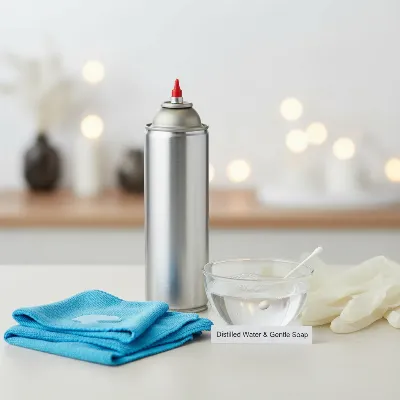 Essential tools for safely cleaning a home projector screen, including microfiber cloths, compressed air, and mild cleaning solution.
Step-by-Step Safe Cleaning Techniques
Approaching projector screen cleaning methodically is key to achieving a clean surface without causing damage. Always start with the gentlest methods and only escalate if necessary, referring to your screen’s specific material guidelines.
Preparation is Key
Before you begin, ensure your workspace is ready. Power down your projector and any other equipment to prevent accidental activation. If you have a retractable screen, fully extend it and secure it so it remains taut and accessible throughout the cleaning process. Put on your gloves to prevent adding new smudges.
Phase 1: Dry Cleaning (For Dust and Loose Debris)
Most of the time, simple dusting is all your screen needs.
- Compressed Air: Hold the can upright and about one inch from the screen surface. Use short, controlled bursts to gently blow away dust, lint, and loose particles. Work your way across the screen in a systematic pattern to ensure complete coverage.
- Dry Microfiber Cloth: For any remaining dust or very light smudges, gently wipe the screen with a clean, dry microfiber cloth. Apply very light, even pressure and move in a consistent, straight direction (either horizontally from left-to-right or vertically up-and-down), never in circular motions. This prevents rubbing dust into the surface or damaging delicate textures.
Phase 2: Spot Cleaning (For Fingerprints and Small Stains)
If dry cleaning isn’t enough for specific marks, you can move to a slightly more intensive spot cleaning.
- Distilled Water Only: For light fingerprints or non-greasy smudges on most screens (especially ALR/CLR if wet cleaning is tolerated), lightly dampen a clean microfiber cloth with distilled water. Wring out all excess liquid until the cloth is just barely moist. Gently blot or wipe the affected area in the manufacturer-recommended direction.
- Mild Soap Solution (for non-coated/matte white screens): For greasy fingerprints or more stubborn dirt on durable vinyl or matte white screens, prepare your mild soap solution (95% distilled water, 5% dish soap). Dampen a microfiber cloth, then thoroughly wring it out until it’s almost dry to the touch – absolutely no dripping. Gently blot or wipe the stain. Never scrub.
- Denatured/Isopropyl Alcohol (for very tough spots on vinyl): As a last resort for challenging, small, stubborn spots on vinyl or non-coated screens, moisten a Q-tip with a tiny amount of denatured or isopropyl alcohol. Gently dab the spot. Immediately use the dry end of the Q-tip or a separate clean Q-tip to dab the area dry, preventing the alcohol from sitting on the surface.
Phase 3: Full Surface Cleaning (For Overall Dirt – Use with Caution)
Full surface wet cleaning should be a rare event and primarily reserved for durable, non-coated, matte white screens.
- Apply Solution: Using your very lightly damp microfiber cloth with the mild soap solution, work in small, manageable sections across the screen. Wipe gently and evenly in a consistent direction (e.g., left-to-right, overlapping slightly). Avoid excessive pressure.
- Rinse and Remove Residue: Immediately follow with a separate, clean microfiber cloth that has been lightly dampened with distilled water only. This step is crucial to remove any soap residue that could leave streaks or attract more dust.
- Pat Dry: Finish by gently patting the entire cleaned area with a fresh, clean, dry microfiber cloth. This prevents water spots and ensures the screen is completely dry.
Post-Cleaning
Before retracting your screen or resuming use, ensure it is absolutely bone dry. Rolling up a wet screen can lead to mold growth, permanent water damage, or adhesion issues.
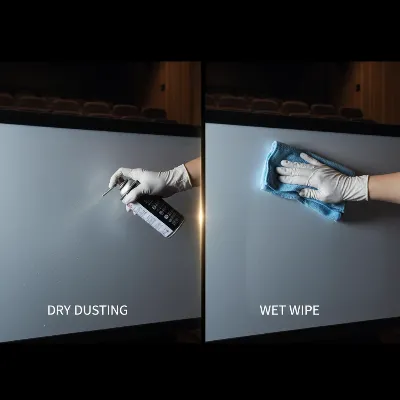 Two-step process for cleaning a projector screen: dusting with compressed air and gentle wiping with a damp microfiber cloth.
Cleaning Specific Projector Screen Types
While the general steps provide a good foundation, different screen installations require specific handling considerations to prevent damage.
Fixed Frame Screens
These screens are stretched taut within a rigid frame, making them relatively stable for cleaning. You can follow the general dry and wet cleaning steps outlined above. The consistent tension minimizes the risk of ripples or distortion during cleaning. However, always be mindful of not applying excessive pressure that could stretch or warp the material over time.
Retractable (Electric/Manual) Screens
Retractable screens, whether motorized or manual, demand extra care due to their mechanical components and the way the fabric is stored.
- Fully Extend and Secure: Always clean a retractable screen when it is fully extended and securely locked into place. This provides a stable surface and prevents accidental retraction during cleaning.
- Avoid Wet Rolling: Never roll up a retractable screen if it is still damp. Ensure it is completely dry to prevent mold, mildew, and material adhesion issues when stored.
- Protect Mechanics: Be cautious not to get any moisture or cleaning solutions near the motor housing, control units, or any mechanical parts of electric screens. Focus only on the visible screen surface.
Ambient Light Rejecting (ALR/CLR) Screens
ALR and Ceiling Light Rejecting (CLR) screens are among the most advanced and delicate projector screen technologies. Their microscopic optical structures are highly susceptible to damage from improper cleaning.
- Prioritize Dry Cleaning: For ALR/CLR screens, dry cleaning with compressed air or a dry microfiber cloth is the safest and often sufficient method for routine maintenance.
- Specific Wiping Directions: If wet cleaning is absolutely necessary for a stubborn spot, always consult your manufacturer for specific instructions. Many ALR screens have a linear horizontal structure and require wiping only in an up-down or side-to-side motion, never circularly. Blotting with a damp (distilled water only) cloth is often recommended over wiping.
- Avoid Most Chemicals: Unless explicitly stated by your screen manufacturer for your specific ALR material, avoid all chemical cleaning solutions. Even mild soap and water can be too aggressive for some ALR coatings.
Coated and Acoustically Transparent Screens
Screens with specialized coatings or perforated acoustically transparent designs also require a gentle touch.
- Coated Screens: As noted earlier, many coated screens should only be cleaned with a dry microfiber cloth or a soft brush. Water and cleaning agents can strip these delicate coatings.
- Acoustically Transparent Screens: These screens have tiny perforations. Use compressed air to gently remove dust from the perforations. A vacuum cleaner with a soft brush attachment on a very low suction setting can also be used carefully to remove debris without damaging the screen. Avoid pushing or scrubbing the perforations.
Preventative Measures for a Pristine Projector Screen
The best way to deal with a dirty projector screen is to prevent it from getting dirty in the first place. Simple, consistent habits can significantly reduce the need for deep cleaning and prolong the life of your screen.
Regular Dusting
Make regular, light dusting a part of your cleaning routine. Weekly or bi-weekly use of compressed air or a dry, soft microfiber cloth to gently remove accumulated dust can prevent particles from settling and becoming harder to remove later. This simple step is highly effective in maintaining clarity.
Storage for Retractable Screens
If you own a retractable projector screen, always keep it rolled up and stored in its casing when not in use. This protects the delicate screen surface from ambient dust, dirt, pet hair, and accidental damage or spills. It also shields it from prolonged exposure to UV light, which can degrade some screen materials over time.
Handling with Care
Avoid touching the projector screen surface directly with bare hands. The oils from your skin can leave behind fingerprints that attract more dirt and are challenging to remove. If you need to handle the screen for adjustments or installation, always wear clean gloves. Teach children and guests to keep their hands away from the screen.
Control Your Environment
Minimize airborne pollutants in the room where your projector screen is installed. Reducing dust, smoke (from cigarettes, candles, or fireplaces), and cooking fumes will significantly decrease the rate at which your screen gets dirty. Consider using an air purifier to maintain cleaner air, especially in dedicated home theater rooms.
Conclusion
A pristine projector screen is fundamental to enjoying the full potential of your home theater or presentation setup. While the thought of cleaning such a delicate surface can be intimidating, by understanding your screen’s material, using the correct gentle tools, and following a methodical, safe approach, you can maintain its optical integrity and ensure brilliant visuals for years to come. Remember, the key is always a gentle hand, the right solutions, and, when in doubt, consulting your manufacturer’s specific guidelines. With regular care and preventive measures, your projector screen will continue to be the star of your visual experience.
What specific challenges have you faced when cleaning your projector screen, and what solutions have worked best for you?
Frequently Asked Questions
How often should I clean my projector screen?
The frequency depends on usage and environment. For most home theaters, a light dusting weekly or bi-weekly is ideal, with a deeper clean every 3-6 months. In dusty or high-traffic areas, more frequent attention may be needed to prevent dirt buildup.
Can I use Windex or glass cleaner on my projector screen?
Absolutely not. Harsh household cleaners like Windex, which contain ammonia or other strong chemicals, can permanently damage the delicate optical coatings and materials of a projector screen, leading to irreparable streaks, discoloration, or reduced performance.
What’s the best way to remove fingerprints from a projector screen?
For most screens, start by gently wiping with a dry microfiber cloth. If the fingerprint persists, lightly dampen a clean microfiber cloth with distilled water and gently blot or wipe the affected area. For stubborn, greasy prints on non-coated vinyl screens, a very mild soap solution (95% distilled water, 5% dish soap) applied with a barely damp cloth may be effective.
My screen has a stubborn stain that won’t come off. What should I do?
First, re-verify your screen’s material and consult the manufacturer’s cleaning guidelines. For vinyl/non-coated screens, a tiny amount of denatured or isopropyl alcohol on a Q-tip, dabbed gently and immediately dried, can be a last resort for tough spots. For ALR or coated screens, if approved methods fail, it’s best to contact the manufacturer for expert advice rather than risk irreversible damage.
Is it safe to use a vacuum cleaner on my projector screen?
Yes, but only with extreme caution. Use a vacuum cleaner equipped with a soft brush attachment and set to the lowest suction power. Gently glide the brush over the screen surface to lift loose dust and debris. Avoid pressing down or scrubbing, as this can scratch the screen or damage perforated materials.
Why is distilled water recommended for cleaning projector screens?
Distilled water is recommended because it is free of minerals and impurities found in tap water. These minerals can leave behind unsightly streaks, water spots, or residue on the delicate surface of a projector screen, especially as the water evaporates, compromising image clarity.
