Considering a motorized projector screen for your home theater or presentation needs? The market offers a vast array of choices, but Akia Screens often emerge as a popular option for their balance of features and affordability. As an experienced technician with a decade dedicated to projector screens, I understand the nuances of what makes a great viewing experience. This in-depth review will examine the quality, performance, and common considerations of Akia motorized projector screens, helping you determine if they are the perfect fit for your setup. We’ll explore various models, screen materials, and the critical factors that influence picture quality and overall user satisfaction.
Common Akia Motorized Projector Screen Types
Akia Screens offers a range of motorized projector screens, each designed to cater to different user requirements and budgets. Understanding the distinctions between these types is crucial for making an informed decision about your home theater or professional presentation space.
Standard Motorized Screens
Akia’s standard motorized screens, often featuring materials like MaxWhite® 2 and MaxWhite® B, are a popular choice for their simplicity and cost-effectiveness. These screens retract smoothly into a durable casing, making them an excellent solution for multi-purpose rooms where a permanent screen isn’t desired. They are generally easy to install, offering both wall and ceiling mounting options.
- Pros and Cons: The primary advantage of these screens is their excellent value, providing a large, retractable viewing surface at an accessible price. They are also known for relatively quiet motor operation and can often support 4K and 8K resolutions, offering a 180-degree viewing angle with 1.0 to 1.1 gain. However, the MaxWhite B material can be somewhat thin, and non-tensioned versions may exhibit minor curling or waves, particularly in cooler environments or with prolonged use. This can be more noticeable with ultra-short throw projectors.
- Sizes and Aspect Ratios: Akia offers these screens in various sizes, commonly ranging from 100 to 150 inches diagonally, with popular aspect ratios like 16:9 and 4:3, accommodating both widescreen cinematic content and standard presentation formats.
- Installation and Maintenance: Installation is typically straightforward, often described as a “plug and play” setup. The screens come with RF remote controls, and many include a 12V trigger for automatic synchronization with your projector. Maintenance involves simple cleaning with mild soap and water for the mildew-resistant surface.
|
Our Picks for the Best Projector Screen in 2026
As an Amazon Associate I earn from qualifying purchases.
|
||
| Num | Product | Action |
|---|---|---|
| 1 | 120inch Outdoor Projector Screen with Stand: 16:9 4K HD Portable Projector Screen Outdoor Indoor - Front/Rear Movie Screen with Carry Bag, Sandbag - Projection Screen for Backyard, Camping, Theater |

|
| 2 | TOWOND Outdoor Projector Screen with stand, 120 inch Portable Movie Screen - 16:9 4K HD Foldable Anti-Crease Projection Screen with Carry Bag for Movie Nights, Camping and Parties Support Double Sided |
|
| 3 | Taotique Projector Screen 72 inch, Movie Projector Screen 16:9 HD Foldable and Portable Anti-Crease Indoor Outdoor Projection Double Sided Video Projector Screen for Home, Party, Office, Classroom |
|
| 4 | TOWOND Projector Screen and Stand, 150 inch Indoor Outdoor Projection Screen, Portable 16:9 4K HD Rear Front Movie Screen with Carry Bag Wrinkle-Free Design for Home Theater Backyard Cinema |
|
| 5 | AAJK Projector Screen 150 inch, Washable Projector Screen 16:9 Foldable Anti-Crease Portable Projector Movies Screen for Home Theater Outdoor Indoor Support Double Sided Projection |
|
| 6 | Projector Screen,HUANYINGBJB 4K 16:9 HD Rear Front Projector Screen Foldable Projection Screen Double-Sided Portable Outdoor Indoor Projector Screens for Movie Home Theater (120) |
|
| 7 | 120 inch Projector Screen 2025 Upgraded- Black Backing, Straight Edges, Foldable, Washable and Wrinkle-Free - for Indoor Home Theater and Outdoor Cinema -White 16:9 by IOLIEO |
|
| 8 | TOWOND Projector Screen with Stand, 100 inch Outdoor Projector Screen Portable Indoor Projection Screen 16:9 4K Rear Front Movie Screen with Carry Bag for Home Backyard Theater 100 inch |
|
| 9 | Pyle 50 Inch Portable Projector Screen with Tripod Stand – Lightweight, Durable, Easy Pull Setup Mobile Projection Screen with 4:3 Aspect Ratio, White Matte Fabric for Indoor/Outdoor Use |
|
| 10 | Outdoor Projector Screen with Stand - 120 Inch Portable Projector Screen Indoor and Outdoor Projector Screens 16:9 4K HD Wrinkle Free Lightweight Movie Screen with Carry Bag,Enioy Movie Nights |
|
Motorized Tab-Tensioned Screens
For those prioritizing a consistently flat viewing surface, Akia’s motorized tab-tensioned screens are a significant upgrade. These screens, often utilizing materials like CineWhite® UHD-B, feature a tensioning system along the sides that pulls the material taut. This design is engineered to prevent edge curling and minor waves, ensuring a pristine, wrinkle-free projection surface.
- Pros and Cons: The most notable benefit of tab-tensioned screens is their superior flatness, which is critical for achieving sharp, undistorted images, especially with high-resolution and short-throw projectors. They offer the same excellent viewing angles and gain as standard screens, supporting 4K and 8K content. The trade-off is typically a higher price point due to the added mechanical complexity and material quality. While the motor is generally quiet, some users might notice slight operational sounds.
- Flatness and Image Quality: The tab-tensioning mechanism makes these screens ideal for critical viewing environments, such as dedicated home theaters or professional screening rooms where image fidelity is paramount. The enhanced flatness ensures that every pixel from your projector is rendered accurately, without any visual imperfections that could detract from the experience.
- Applications: These screens are perfectly suited for cinephiles and professionals who demand the best possible image quality from their projection system. They integrate seamlessly into smart home setups, offering automatic operation synchronized with other components.
Floor Motorized Screens
Akia also offers floor-rising motorized screens, such as the AK-FMT series, which retract vertically into a floor-standing casing. This design is highly flexible, making it an excellent choice for environments where wall or ceiling installation is not feasible or desired.
- Pros and Cons: The main advantage is the incredible versatility and portability. These screens can be deployed in virtually any space, offering a large projection surface without permanent installation. However, they are generally heavier and can be more complex in their mechanical design, potentially influencing their price and setup. Some models in this category feature tab-tensioning, further enhancing flatness.
- Design and Flexibility: The self-standing design allows for easy repositioning, which is ideal for multi-use rooms or temporary setups. When retracted, the screen housing sits discreetly on the floor, preserving the room’s aesthetics.
- Target Audience: Floor motorized screens appeal to users who need a large, high-quality display that can appear and disappear on demand without structural modifications, perfect for renters, flexible workspaces, or grand living areas.
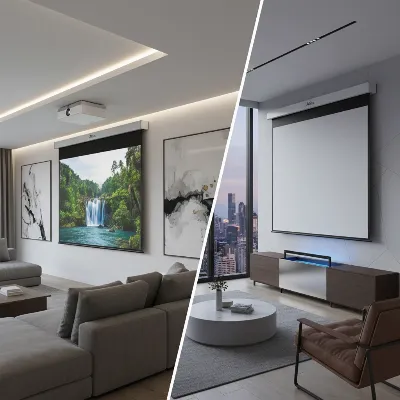 Akia motorized projector screens, illustrating different types like wall-mounted and floor-rising
Comparing Akia Motorized Screen Technologies
Choosing the right Akia motorized projector screen involves weighing several factors. While all Akia motorized screens offer convenience, their specific features, especially related to material and tension, can significantly impact performance.
Detailed Comparison
Let’s consider a detailed comparison across important criteria:
| Feature | Standard Motorized (e.g., MaxWhite® B) | Motorized Tab-Tensioned (e.g., CineWhite® UHD-B) | Floor Motorized (e.g., AK-FMT) |
|---|---|---|---|
| Price | More affordable | Mid to High-range | High-range (due to complex mechanism) |
| Material | MaxWhite® 2, MaxWhite® B (often thinner) | CineWhite® UHD-B, thicker PVC | CineWhite® (can be tab-tensioned) |
| Flatness | Good, but minor waves/curls possible, especially with UST | Excellent, consistently flat due to tensioning | Excellent (if tab-tensioned), good otherwise |
| Image Quality | Very good for standard throw, 4K/8K ready | Outstanding, superior for all projector types including UST | Excellent, especially with tensioned floor models |
| UST Projector Comp. | Not recommended for non-tensioned; may show distortion | Highly recommended | Recommended, especially tab-tensioned versions |
| Ambient Light | Limited ambient light rejection; best in dark rooms | Limited ambient light rejection; best in dark rooms | Limited ambient light rejection; best in dark rooms |
| Portability | Fixed installation (wall/ceiling) | Fixed installation (wall/ceiling) | Highly portable, discreet when retracted |
Overall Assessment and Recommendations
Akia provides solid choices for various needs. For budget-conscious buyers or those with standard throw projectors and controlled lighting, the standard motorized screens offer exceptional value and good performance. They deliver clear, vibrant images for most home applications. However, if you are investing in a high-end ultra-short throw projector or demand absolute image perfection without any material imperfections, the motorized tab-tensioned screens are undoubtedly the superior choice. Their taut surface ensures zero distortion, making them ideal for critical viewing. Floor motorized screens offer unparalleled flexibility for unique spaces or temporary setups, marrying the benefits of a large screen with the convenience of discreet storage.
Key Factors When Choosing an Akia Motorized Projector Screen (Buying Guide)
Selecting the ideal Akia motorized projector screen involves carefully considering several critical factors to ensure it perfectly matches your viewing environment, projector capabilities, and aesthetic preferences.
Size and Aspect Ratio
The size of your projector screen should be determined primarily by your viewing distance and room dimensions. A general rule of thumb is that the screen width should be roughly half your viewing distance for an immersive experience. Akia offers a variety of sizes, typically from 100 to 150 inches diagonally. The aspect ratio is also crucial:
- 16:9: The most common widescreen format, ideal for movies, TV shows, and modern gaming.
- 4:3: Standard definition, often used for business presentations and older content.
- 2.35:1: Cinemascope format, for an ultra-wide, truly cinematic experience.
Choosing the right aspect ratio ensures that your content fills the screen appropriately without distracting black bars.
Screen Material
Akia utilizes several proprietary screen materials, each with distinct characteristics impacting image quality:
- MaxWhite® 2 and MaxWhite® B: These are Akia’s standard matte white materials, offering a wide 180-degree viewing angle and gains of 1.0 to 1.1. They produce accurate colors and are versatile for various content. MaxWhite B can be thinner, which might contribute to minor curling in non-tensioned screens.
- CineWhite® UHD-B: A more robust PVC material often found in tab-tensioned screens, known for its excellent flatness and enhanced detail for 4K/8K content. It also offers a wide viewing angle and neutral color reproduction.
- SilkWhite® 2: Another versatile material, offering good color and clarity.
The choice of material affects brightness, contrast, and color fidelity. Higher gain materials can boost brightness but may narrow the viewing angle. Akia’s materials generally aim for a balanced gain (around 1.0-1.1) to maintain wide viewing angles and accurate colors.
Contrast and Brightness
While the projector primarily dictates contrast and brightness, the screen material plays a supporting role. A good screen material like Akia’s black-backed MaxWhite or CineWhite materials helps prevent light penetration, enhancing overall picture contrast by ensuring blacks remain deep and colors vibrant. The screen’s gain also influences perceived brightness; a 1.0 gain screen reflects the projector’s light equally, maintaining the intended brightness levels.
Viewing Angle
Akia screens typically boast a wide 180-degree viewing angle. This means that viewers positioned off-center can still enjoy a clear, bright image without significant loss of quality or color shift. A wide viewing angle is particularly beneficial in larger rooms or commercial settings where audience members are seated across a broad area.
Ambient Light Rejection
Most standard Akia motorized screens, while excellent for their price, do not feature advanced ambient light rejecting (ALR) properties. This means they perform best in dark or light-controlled environments. If your viewing space has significant ambient light (e.g., from windows or overhead lighting), you might experience washed-out images. For bright rooms, Akia recommends specific ALR materials or fixed-frame CLR® (Ceiling Light Rejecting) screens, which are designed to combat overhead light and improve contrast in illuminated spaces.
Motorization and Control
Akia motorized screens offer various control options for convenience:
- RF (Radio Frequency) Remote: Provides control from a greater distance and doesn’t require direct line of sight.
- IR (Infrared) Remote: Requires direct line of sight, often included for basic control.
- Wall Box Controller: A wired control panel mounted on the wall, offering manual up/stop/down functions.
- 12V Trigger: A highly convenient feature that synchronizes the screen’s movement with your projector’s power cycle, automatically deploying or retracting the screen when the projector turns on or off. This is available wirelessly via RF or wired through the wall box controller.
Most users praise the quiet operation of Akia motors, though some larger screens might exhibit minor noise.
Brand and Price
Akia Screens is a sub-brand of Elite Screens, known for offering more affordable options without compromising significantly on quality. They focus on providing competitive prices while maintaining high standards for online consumers. Compared to premium brands, Akia delivers excellent value, especially for those seeking a high-quality motorized screen on a moderate budget. Researching user reviews and comparing features against your budget will help you find the best deal.
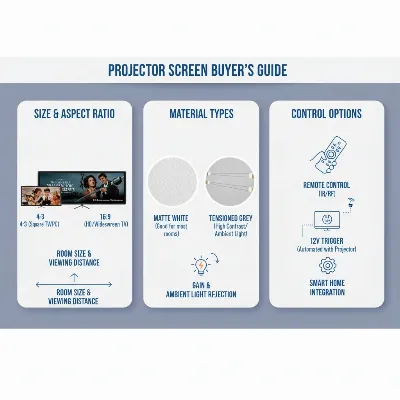 A detailed infographic illustrating key factors to consider when buying a projector screen, including size, material, and tension
Conclusion
Akia motorized projector screens present a compelling option for a wide range of users, from casual movie watchers to dedicated home theater enthusiasts. They strike an impressive balance between affordability and performance, offering essential features like 4K/8K readiness, wide viewing angles, and convenient control options. While standard models provide great value, investing in a tab-tensioned variant is highly recommended for critical viewing or if you use an ultra-short throw projector, ensuring a perfectly flat and pristine image. By carefully considering your room environment, projector type, and specific viewing preferences, you can confidently select an Akia screen that elevates your projection experience. What specific feature are you most excited to integrate into your home theater setup?
Frequently Asked Questions
What causes projector screen material to curl, and how can it be prevented?
Screen curling, especially in non-tensioned materials, is often caused by variations in room temperature, typically when the temperature drops below 65°F (18.33°C). While curling usually doesn’t distort the projected image significantly, it can be mitigated by ensuring the screen is used within a recommended temperature range of 65-85°F (18.33°C-29.44°C). Opting for a tab-tensioned screen is the most effective way to prevent curling, as the tensioning system actively pulls the material taut.
Are Akia motorized screens compatible with Ultra Short Throw (UST) projectors?
Akia’s non-tensioned motorized screens are generally not recommended for Ultra Short Throw (UST) projectors. UST projectors require an exceptionally flat surface to prevent image distortion, and the minor waves or curls present in non-tensioned screens can become more pronounced. For optimal performance with UST projectors, Akia strongly recommends using their tab-tensioned motorized screens or fixed-frame screens, as these provide a consistently flat projection surface.
